
Can I use Multi-Steps / Pages in my Forms?
Yes. POWR Forms supports forms with multiple pages using the Page element. Multi-page forms let your site visitors fill out your form across several steps instead of one long single-page form, which is a great way to streamline the look, improve completion rates, and organize longer forms into logical sections.
Why use a multi-page form?
Higher completion rates: long single-page forms can feel overwhelming. Breaking them into smaller steps often increases the number of people who make it to the end
Logical grouping: group related fields together (e.g., "Contact Info" on page 1, "Order Details" on page 2, "Payment" on page 3)
Better mobile experience: shorter pages are easier to fill out on mobile devices
Progressive disclosure: show only what's relevant at each step, keeping the form clean and focused
How to enable and create pages
Open your Form Editor
Click on the Form section, then click +Add Page
Find and click on the Page element
Page 1 will automatically appear at the top of your elements selection
Page 2 will automatically appear at the bottom of your elements selection, but you can click and drag the element to move it wherever needed
To add more pages, click +Add Element and select the Page element again
Repeat for every page you'd like to add
Learn how to add elements here
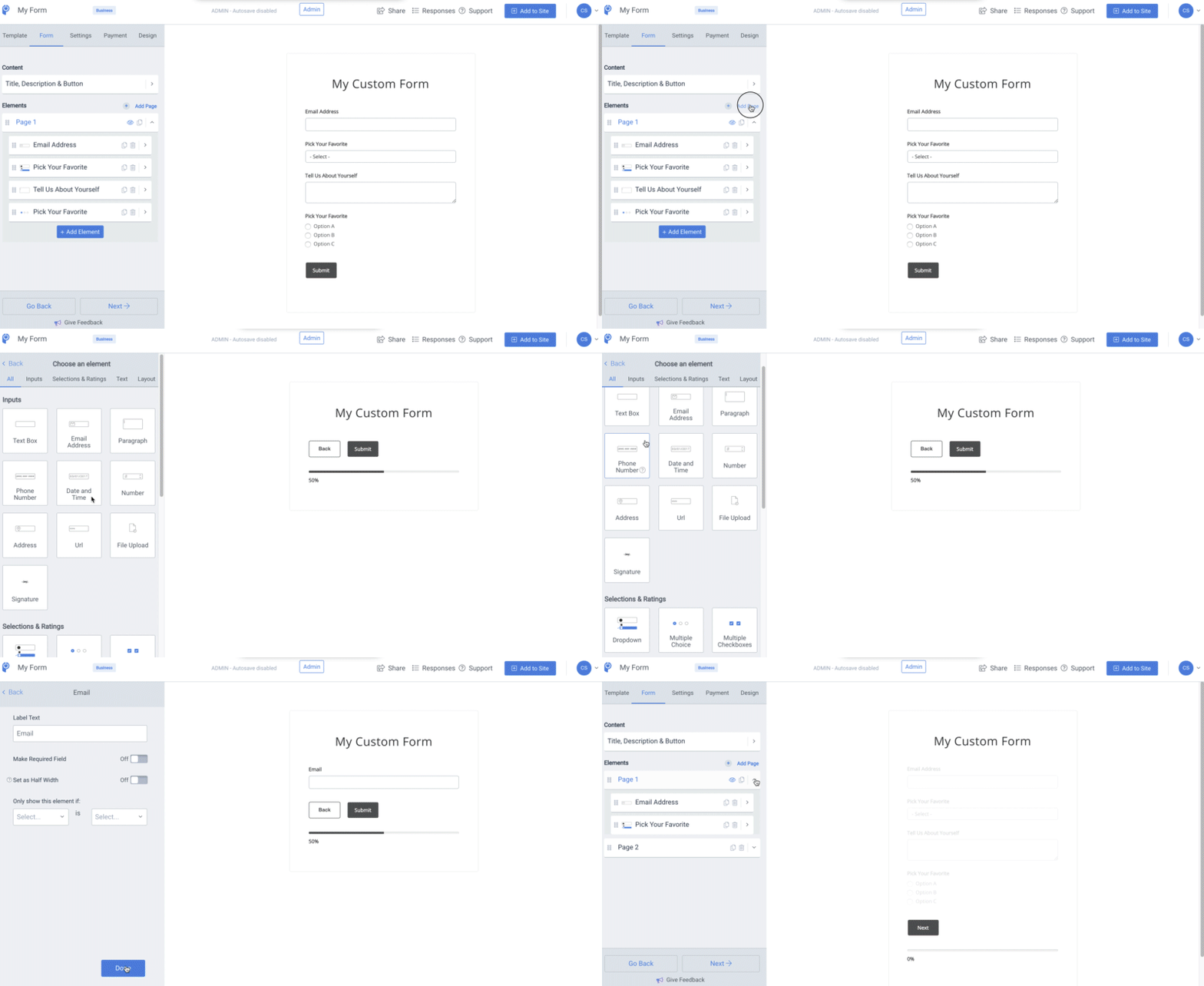
Each page element you add creates another form page for your site visitors to fill out. Simply drag and drop your form elements between pages to organize them the way you want.
How your visitors will experience it
Site visitors fill out one page at a time
They can click Next to move forward through the pages
They can always go back to the beginning to edit their answers before submitting
Only when they reach the final page and click Submit does the full form get sent to you
Tips for effective multi-page forms
Keep pages balanced: aim for a similar number of fields per page so no single step feels much longer than others
Put your easiest fields first: starting with quick, low-friction fields (name, email) builds momentum
Save payment or sensitive fields for the last page: so users are more invested before hitting them
Use clear page headings with the Label or Plain Text elements at the top of each page so users know where they are in the form
Test the flow yourself before publishing, click through as if you were a visitor to catch any awkward transitions or misplaced elements
Watch a quick tutorial
Prefer to see it in action? Watch this POWR Hack tutorial for a walkthrough of setting up multi-page forms.
Note
Multi-Page is an upgraded feature, meaning it's available on paid plans. Check your plan in your POWR dashboard to confirm access, or reach out to our support team if you'd like to explore upgrading to unlock it.
Need Help?
If you need any help or have any questions about our Form Builder, our support team is happy to help.
Contact our support team
When contacting us, you'll be prompted to authenticate your email by signing in, and a confirmation code will be emailed to you. This helps ensure our support team's reply will be delivered to you with no issue.
For more information about available features, visit our Pricing Page:
https://www.powr.io/pricing