
How to add Elements to POWR Forms
Building your POWR Form is as simple as choosing which fields you want and adding them one at a time. Whether you need a dropdown for country selection, checkboxes for terms and conditions, or text fields for names and emails, everything is added through the + Add Element button in the POWR Editor.
Quick steps
Open the POWR Editor for your Form Builder app
Go to the Form section and click + Add Element
Choose the type of element you'd like to add, it will immediately appear on your form
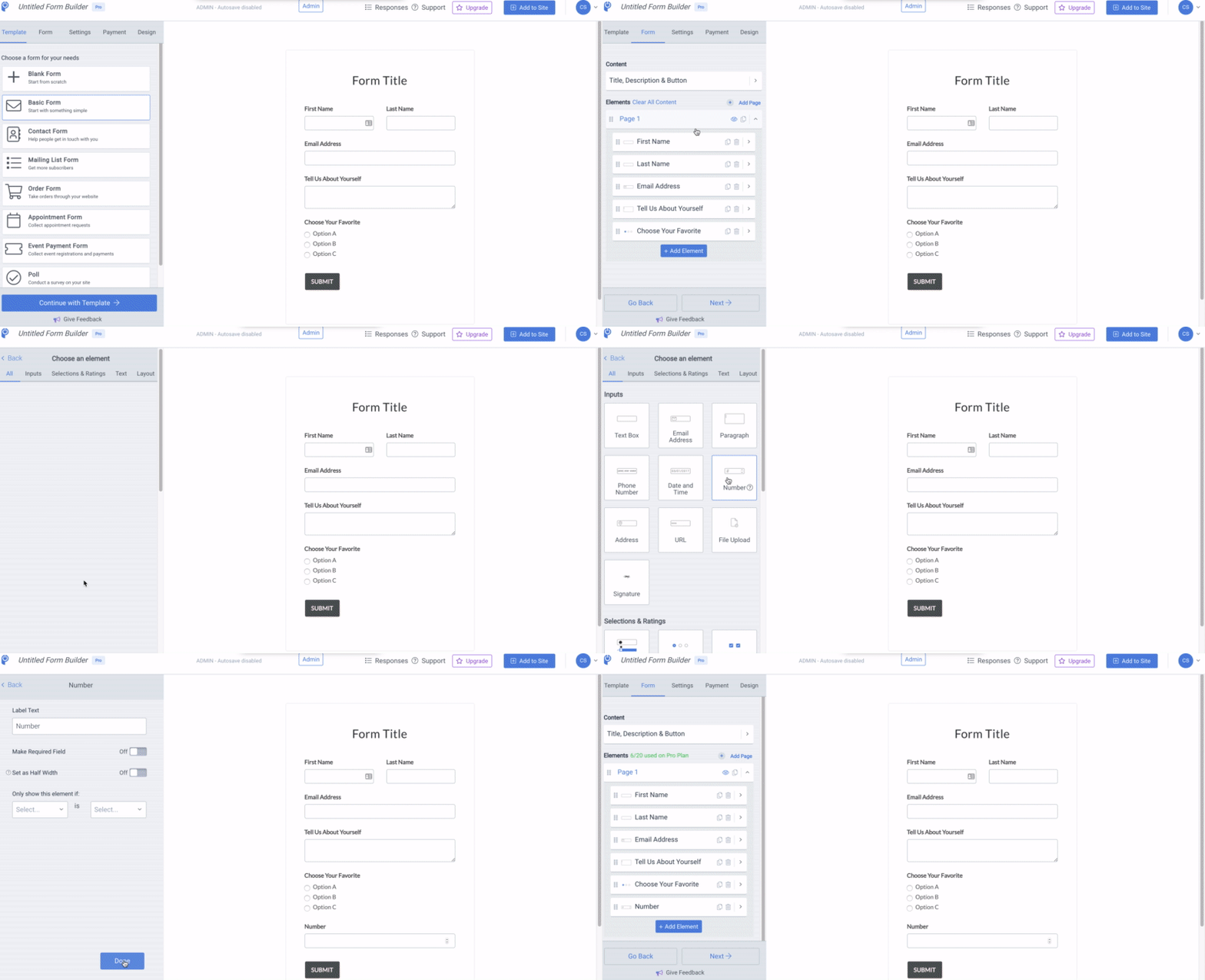
Available element types
POWR Forms supports a wide range of element types organized into categories:
Inputs
Text Box: single-line text input for short answers
Name: dedicated name field with first and last name handling
Email Address: email input with built-in format validation
Paragraph: multi-line text input for longer responses
Phone Number: phone input with optional country code selector
Date and Time: date picker, time picker, or both for scheduling and event fields
Number: numeric input for quantities, ages, or any numeric value
Address: all-in-one address field including street, city, state/province, ZIP/postal code, and country
URL: link input with URL format validation
File Upload: allow visitors to attach documents, images, or other files with their submission
Signature: e-signature field for agreements, waivers, or approvals
Selections & Ratings
Dropdown: single-select dropdown menu for picking one option from a list
Multiple Choice: single-select with all options visible (radio buttons)
Multiple Checkboxes: multi-select for options where users can pick more than one
Checkbox: a single checkbox for opt-ins or confirmations
Rating: star rating input for feedback forms
Ranking: let respondents rank options in order of preference (New)
Emoji Feedback: capture sentiment quickly with emoji-based feedback (New)
Picture Choice: let respondents choose from a set of images
Text
Label: add a title or section label to your form
Plain Text: insert instructional or explanatory text between fields
GDPR Compliance: pre-formatted GDPR consent text for compliance
Image
Add images anywhere in your form to enhance visual appeal or provide context
Layout
Space: add vertical spacing between form elements
Line Break: insert a horizontal line to visually separate sections
Apps
Countdown Timer: embed a countdown timer into your form for time-sensitive offers or deadlines
Editing an element after adding it
Once an element is added to your form:
Click on it to open its settings panel
Customize the label (the visible field name your visitors see)
Set it as required or optional using the toggle
Add placeholder text or default values where applicable
Rearrange elements by dragging them up or down in the form order
Delete an element using the trash icon in its settings panel
Tips for building effective forms
Keep it short. The more fields you add, the fewer submissions you're likely to receive. Only ask for what you truly need
Order matters. Put easy fields (name, email) first and any longer or more personal fields last
Test on mobile since most form submissions come from mobile devices
Preview before publishing so you catch typos or missing elements before your visitors see them
Use Layout elements (Space and Line Break) to group related fields visually and make longer forms feel less overwhelming
Common questions
Can I add my own custom field type?
POWR offers a wide range of built-in element types covering most common use cases. Adding entirely custom field types isn't supported, but if you have a specific need that isn't covered, reach out to our support team, we may be able to suggest a workaround using existing elements.
How many elements can I add to one form?
That depends on your plan tier. Free plans have element limits; paid plans offer more elements or unlimited element counts. Check your plan's specifics in your POWR dashboard.
Can I duplicate an existing element?
Yes, click on any element and look for the duplicate option in its settings panel. Useful when you have several similar fields.
Need Help?
If you need any help or have any questions about our Form Builder, our support team is happy to help.
Contact our support team
Note: You need to sign up with your email to contact us.
For more information about available features, visit our Pricing Page