
Allow Users to Print your Forms
If you'd like to allow users to fill out your form offline, you can enable Print View for your form under the Pro or Business subscription
To do that, follow these steps:
Open your Form Editor (or App Settings if you are using Wix) and go to the Settings tab.
Scroll down and click Printing.
3. Toggle on Enable your visitors to print your form, and A small printer icon will then appear at the bottom of your form, underneath the submit button.
4. Click the Publish button on the top right to save your form.
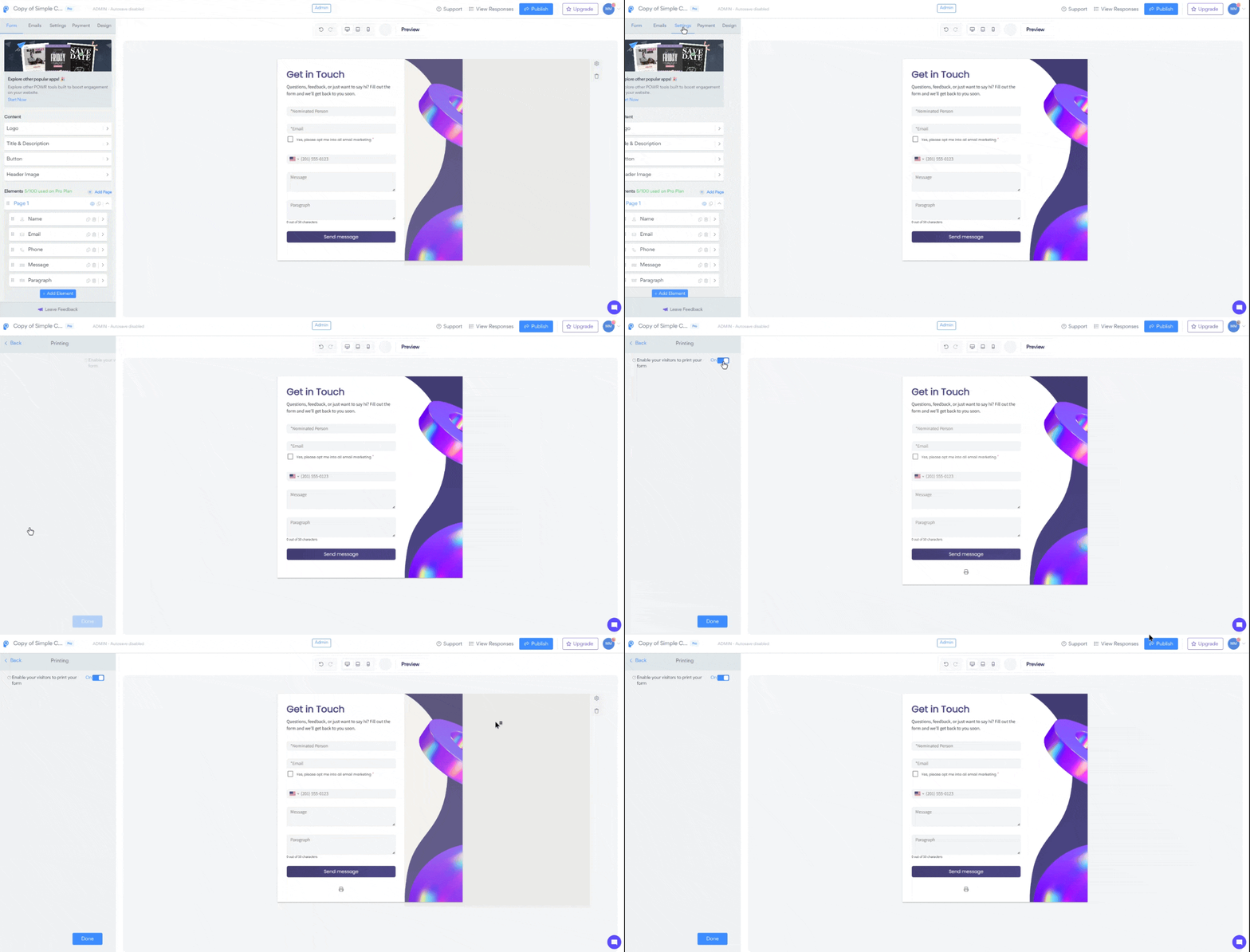
Clicking on that icon will open the browser's printing settings and let the end-user print the entire form.
Dropdown elements are automatically converted to Multiple Choice options for the Print View, so the end-user can see the different options. File Upload elements and other elements that aren't useful in printed form are removed in the print layout.
Need More Help?
If you need any help or have any questions about our Form Builder, our support team is happy to help.
Contact our support team
When contacting us, you'll be prompted to authenticate your email by signing in, and a confirmation code will be emailed to you. This helps ensure our support team's reply will be delivered to you with no issue.
For more information about available features, visit our Pricing page