
Setting up Form Builder in Wix
Setting up your first form with POWR Form Builder on Wix is quick; no coding is required. Here’s a step-by-step walkthrough.
Add the app to your site.
Open your Wix Editor
Click the Add Apps icon from the left-hand menu
Search for POWR Form Builder (or visit POWR Form Builder Plus+ on the Wix App Market)
Click Add to Site
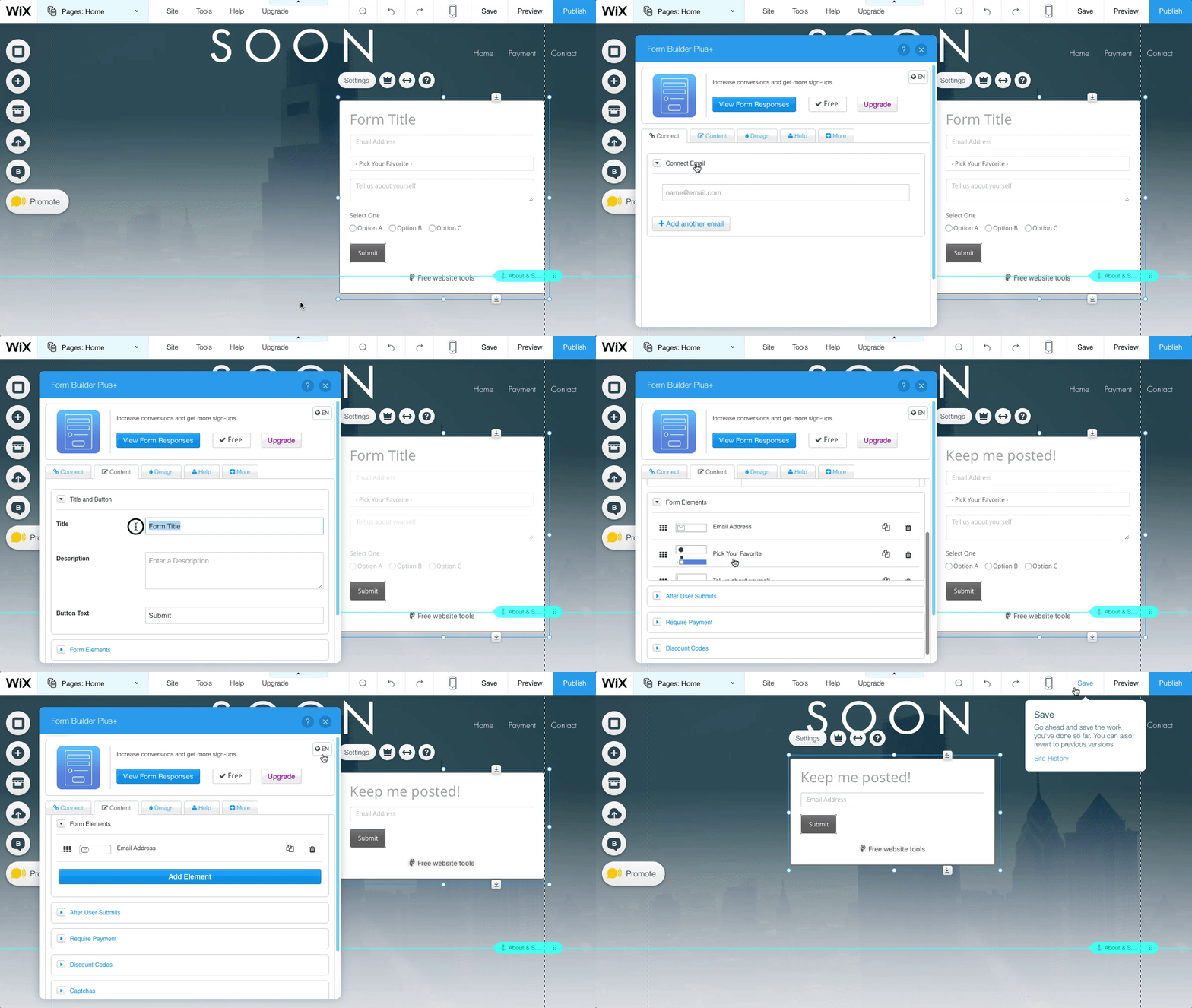
Once added, click on the form to open the App Settings panel
You can change the design and styling of your form later. First, make sure to fill in the key information.
Add important info
Before worrying about design, cover the essentials:
1. Your email address
So you know when someone fills out your form. Add the email where you want to receive submission notifications.
2. Form title
So your visitors know what they’re filling out. Clear, specific titles work best (e.g., “Contact Us,” “Request a Quote,” “Join Our Newsletter”).
3. Form elements
Try adding a new form element, like a dropdown, checkbox, or text field. This is how you create fields for users to enter their information or answers. POWR offers a wide range of element types, including:
Text Box, Name, Email, Phone, Paragraph
Dropdown, Multiple Choice, Checkbox
Date and Time, File Upload, Signature
Rating, Ranking, Emoji Feedback
For a full list, see How to Add Elements to POWR Forms.
Finishing up
Once you've created your form, Save and Publish the page where the app appears, and your form will be up and running.
You can also set up your form to collect payments, send confirmations, and even connect to MailChimp, all right inside the App Settings.
Need Help?
If you need any help or have any questions about our Form Builder, our support team is happy to help.
👉 Contact our support team
When contacting us, you'll be prompted to authenticate your email by signing in, and a confirmation code will be emailed to you. This helps ensure our support team's reply will be delivered to you with no issues.
For more information about available features, visit our Pricing Page:
https://www.powr.io/pricing