
Send an Invoice with POWR Pay Me
With POWR Pay Me invoices, you can bill a customer in a couple of clicks. POWR emails them an invoice from your business with a Pay button, reminds them if it's overdue, and marks it paid when the money arrives in your Stripe, Square or PayPal account. In this article we'll walk you through sending your first invoice.
Note: To send invoices, set up Pay Me and connect Stripe, Square or PayPal first (see Getting Started with POWR Pay Me). POWR doesn't charge a fee on invoice payments.
Step 1: Open New Invoice
Log in to your POWR dashboard and click Pay Me in the left menu.
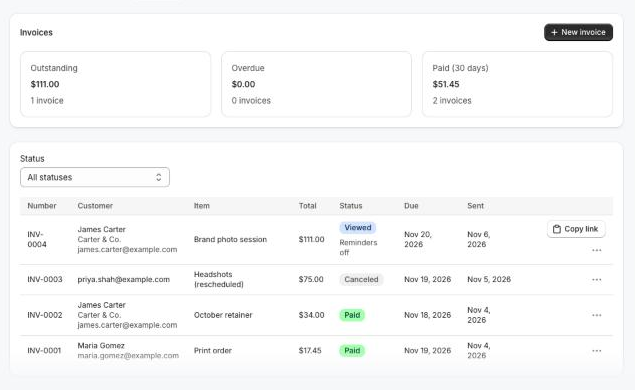
Open the Invoices tab.
Click New invoice.
The Invoices tab also shows what you're owed: Outstanding, Overdue and Paid (30 days).
Step 2: Fill In the Invoice
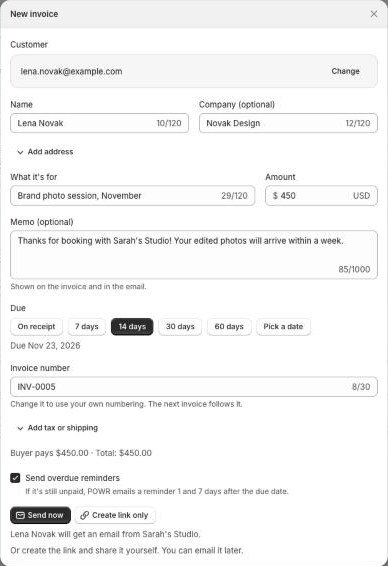
Under Customer, search your contacts, or type an email and click Bill followed by that email.
Check the customer's Name, and add a Company or an address if you'd like them on the invoice.
Under What it's for, describe the work, for example Brand photo session, November, and enter the Amount (at least $0.50).
Add a Memo if you like. It's shown on the invoice and in the email.
Choose when it's Due: on receipt, in 7, 14, 30 or 60 days, or pick a date. 14 days is selected for you.
Keep the suggested Invoice number or type your own. The next invoice follows your numbering.
Click Add tax or shipping if you need them.
If the name, company or address you type is different from what the contact already has, you'll see an Also update checkbox. Leave it unchecked to use the new details on this invoice only. Empty contact fields are filled in either way.
Step 3: Send It
Send now: POWR emails the invoice to your customer.
Create link only: you get the invoice's link to share yourself, in a text or DM for example. You can email it later with Send by email.
Send overdue reminders is on by default. If the invoice is still unpaid, POWR emails your customer a reminder 1 and 7 days after the due date. See Invoice Statuses and Reminders.
Send an Invoice from a Contact
Go to Contacts and open the contact.
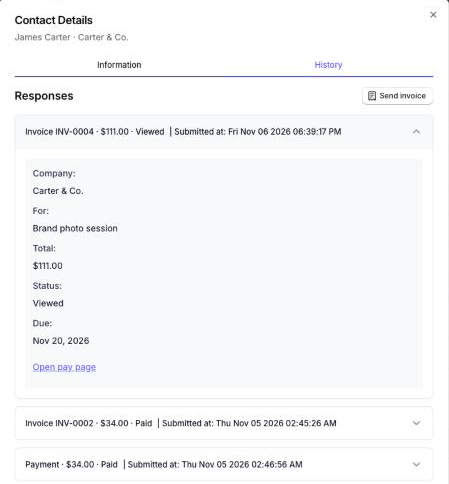
Open the History tab and click Send invoice.
The New invoice form opens with that customer already chosen. A contact's History also shows their invoices and Pay Me payments.
What Happens Next
Your customer gets an email from your business with the invoice and a Pay button.
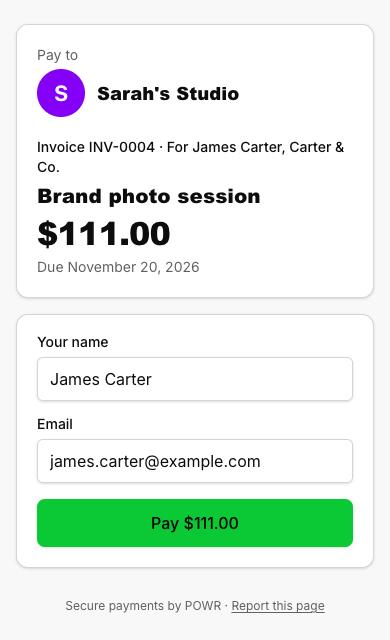
When they open the pay page from that email, the invoice shows as Viewed, and their name and email are already filled in.
When they pay, the invoice turns Paid, the money goes to your Stripe, Square or PayPal account, and your customer gets a receipt with the invoice number.
The customer is added to your Contacts if they weren't there already. They aren't subscribed to marketing.
Frequently Asked Questions
Can my AI assistant send invoices?
Yes. If you've connected POWR to Claude or ChatGPT, just ask, for example "Invoice james@example.com $450 for the brand photo session, due Friday". It reads the invoice back to you and asks before emailing anyone. See Use POWR Pay Me from Claude or ChatGPT.
My customer says they never got the invoice.
Ask them to check their spam folder, and check the email address on the invoice. Then click Resend on the invoice, or Copy link and send it yourself.
Can I change an invoice after sending it?
Not yet. Cancel it and send a new one with a new invoice number. You can still resend it, or turn its reminders on or off.
Can I add several items, or send a PDF?
Not yet. Each invoice has one item, paid in full, in US dollars.
My customer paid with a different email. Is the invoice still marked paid?
Yes. The payment is tied to the invoice's link, so it turns Paid whichever email they use.
It says I can't send any more invoices right now.
There's an hourly and daily limit on invoice emails per site, to stop spam. Try again later, or contact our support team.
Can I change the invoice email's design?
Not yet. The invoice email is sent from your business name, with the invoice details and a Pay button.
Need Help?
If you have any questions about POWR Pay Me, our support team is happy to help.