Invoice Statuses and Reminders in POWR Pay Me
Your Invoices tab in Pay Me shows every invoice you've sent and where it stands. In this article we'll explain each status, how POWR's overdue reminders work, and how to resend or cancel an invoice.
Invoice Statuses
Not sent: you created the invoice with Create link only and haven't emailed it.
Sent: POWR emailed the invoice to your customer.
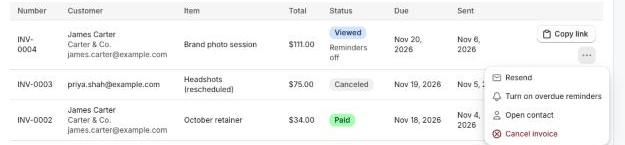
Viewed: your customer opened the pay page from the invoice email.
Paid: your customer paid. The money is in your Stripe, Square or PayPal account.
Overdue: the due date has passed and it's still unpaid.
Canceled: you canceled it. Its link no longer takes payments.
Use the Status filter to see only one kind, for example everything that's overdue. Reminders off under a status means POWR won't send that invoice's overdue reminders.
Manage an Open Invoice
Click Copy link to share an invoice yourself. For more, click the … menu on its row:
Resend emails it again (or Send by email if it hasn't been emailed yet). You can resend an invoice once an hour.
Turn off overdue reminders or Turn on overdue reminders for that invoice.
Open contact shows the customer's contact and history.
Cancel invoice stops its link taking payments. This can't be undone.
Overdue Reminders
When Send overdue reminders is on for an invoice and it's still unpaid, POWR emails your customer a reminder 1 day and 7 days after the due date. Reminders stop as soon as the invoice is paid or canceled.
Reminders are on by default for new invoices. To change that default, go to Settings → Payments and find Invoices. Changing the default doesn't change invoices you've already sent; turn those on or off from the Invoices tab.

What Your Customer Sees
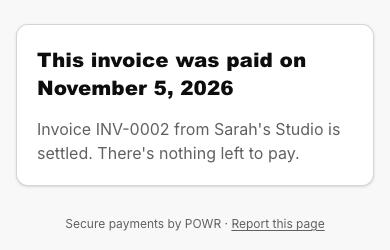
Once an invoice is paid or canceled, its link tells your customer so and can't take another payment.
Automate Your Own Follow-Ups
Want to send your own thank-you note, or a personal follow-up after 14 days? Use the Invoice sent, Invoice overdue and Invoice paid automation triggers. See Automations When Someone Pays You.
Frequently Asked Questions
Does "Viewed" mean they read the email?
It means they opened the invoice's pay page from the email. Email opens aren't tracked.
My invoice turned overdue a little early.
Due dates are counted in UTC, so in the Americas an invoice can turn overdue on the evening of its due date. Reminders go out once a day.
Can I reopen a canceled invoice?
No. Send a new invoice instead.
Can I cancel a paid invoice?
No. To give the money back, refund the payment in Stripe, Square or PayPal. See Refunds and Disputes in POWR Pay Me.
Need Help?
If you have any questions about POWR Pay Me, our support team is happy to help.