Refunds and Disputes in POWR Pay Me
In this article
In this article group
- Getting Started with POWR Pay Me
- Create and Share a POWR Pay Me Payment Link
- Connect PayPal or Stripe to POWR Pay Me
- Your POWR Pay Me Payments
- Add a Payment Link to a POWR Email
- Automations When Someone Pays You
- Use POWR Pay Me from Claude or ChatGPT
- POWR Pay Me Limits and FAQs
- Paying on powrpay.me: Help for Customers
POWR never holds your money: every Pay Me payment goes straight to your PayPal or Stripe account. That's also where you refund a payment or respond to a dispute. Pay Me then shows the refund in your payments list.
How to Refund a Payment
Go to Pay Me → Payments and find the payment.
Click View in PayPal or View in Stripe.
Click Refund in PayPal or Stripe and choose the full amount or part of it.
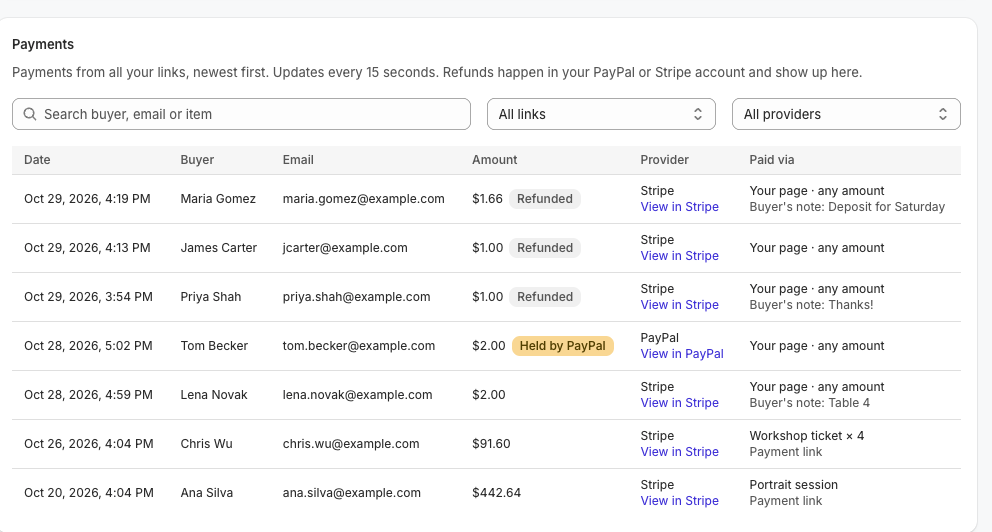
The payment then shows Refunded or Partially refunded in Pay Me: usually within a minute or two for Stripe, and within about an hour for PayPal. Your Money collected total drops by the refunded amount.
Held PayPal Payments
A payment that PayPal is holding (because PayPal setup isn't finished) can't be refunded. If setup isn't finished within 30 days, PayPal returns it to the customer automatically and it shows Returned to buyer.
Disputes and Chargebacks
Disputes are handled entirely in PayPal or Stripe. Respond to them there, as you would for any other payment.
When a Customer Asks for a Refund
Only you can refund your customers. If a customer contacts POWR, we'll point them to you.
Want to email customers when you refund them? Use a Payment refunded automation (see Automations When Someone Pays You).
Frequently Asked Questions
Does POWR refund its fees?
POWR doesn't charge a fee on Pay Me payments. PayPal's and Stripe's own rules apply to their processing fees.
Does the customer get a refund receipt?
PayPal and Stripe send their own refund notifications.
Need Help?
If you have any questions about POWR Pay Me, our support team is happy to help.