
Intro to POWR Email Marketing App
The POWR Email Marketing App makes it easy to create and send custom email campaigns; no technical skills or external tools required. Whether you're sharing updates, promoting a product, or nurturing leads, this app gives you a simple way to stay connected with your audience directly from your POWR dashboard.
The app can be installed either within the Wix app store or from your POWR account.
This article gives a quick overview of what the app does, how it works, and how to get started. It contains the following topics:
What are the limitations?
What is POWR Email Marketing app?
POWR Email Marketing lets you send beautiful, professional emails to your contacts without leaving the POWR platform.
Key features include:
Build and design email campaigns in a drag-and-drop editor
Send one-time broadcasts to your subscribers
Track opens, clicks, bounces, and deliveries
View campaign metrics in real time
The app is ideal for newsletters, product launches, updates, sales promotions, and more.
How to Use the App?
STEP 1: Install on Your Site
- Are you a Wix user? You can add it to your site directly from the app store: Install here👉 https://www.wix.com/app-market/email
- For all other platforms, it can be installed directly from your POWR account:👉 https://www.powr.io/email-website-app
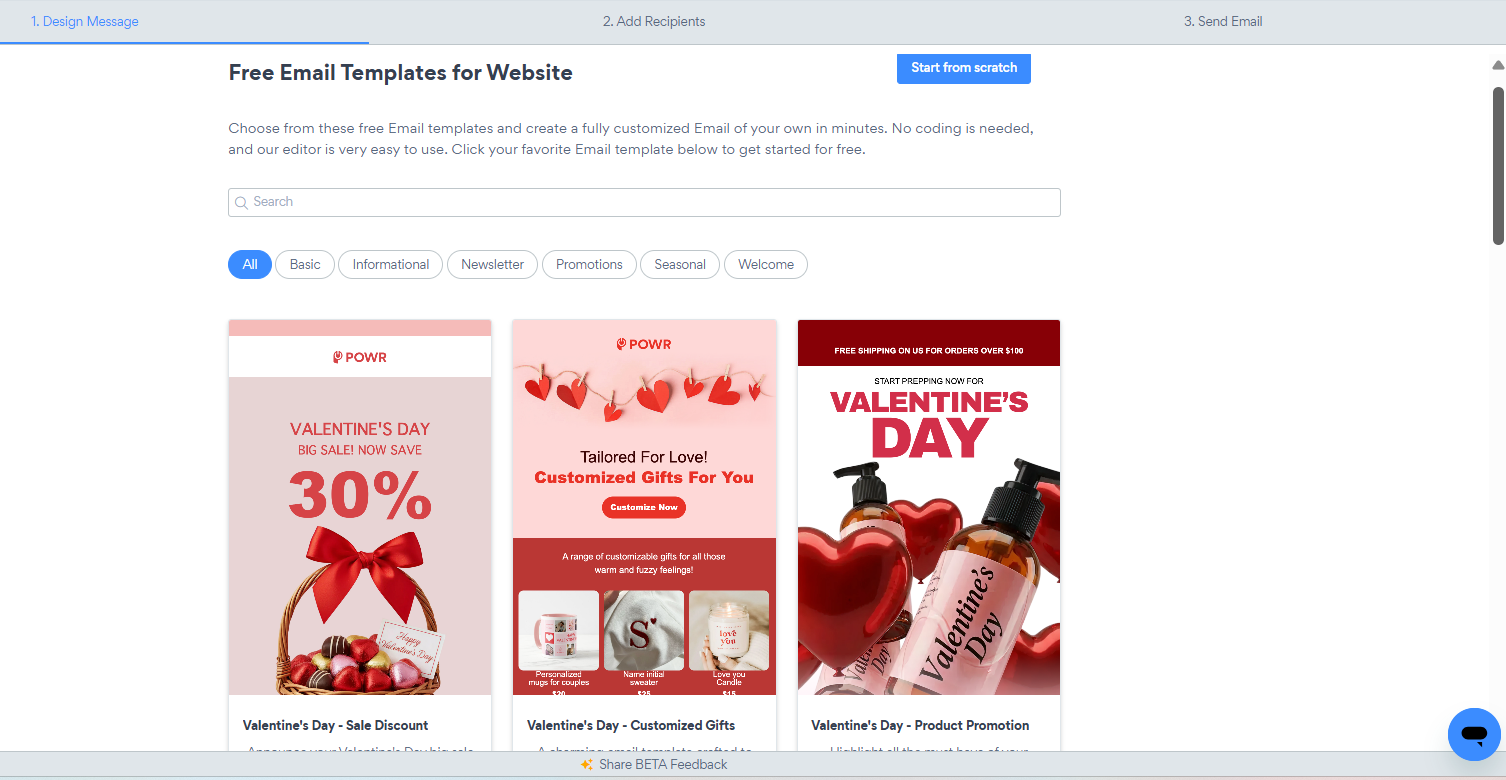
STEP 2: Choose a Template or Start from scratch
After installing the app, you will be prompted to select a pre-built template of your choice that can be further customized, or simply start from scratch in order to design your campaign.
STEP 3: Customize as Needed
Once you're in, you will be redirected to the editor to apply all the remaining changes to set up the campaign content and design.
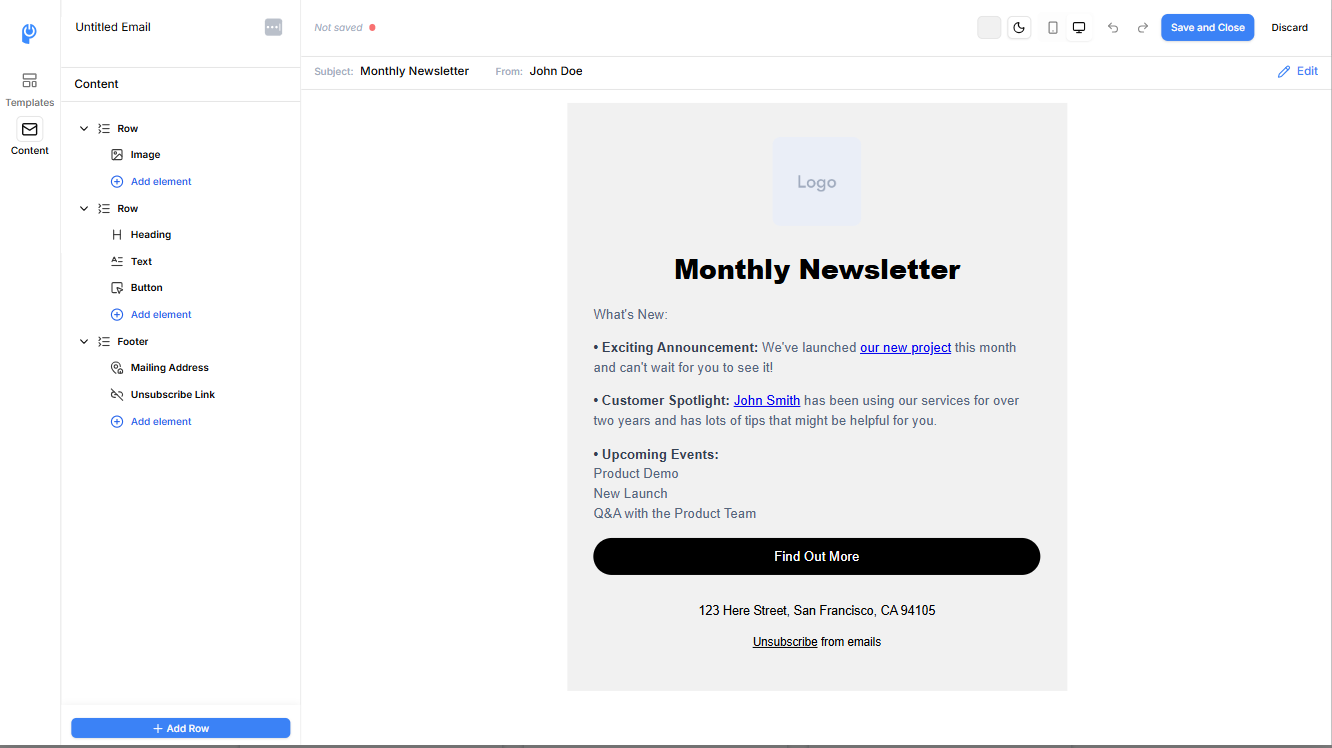
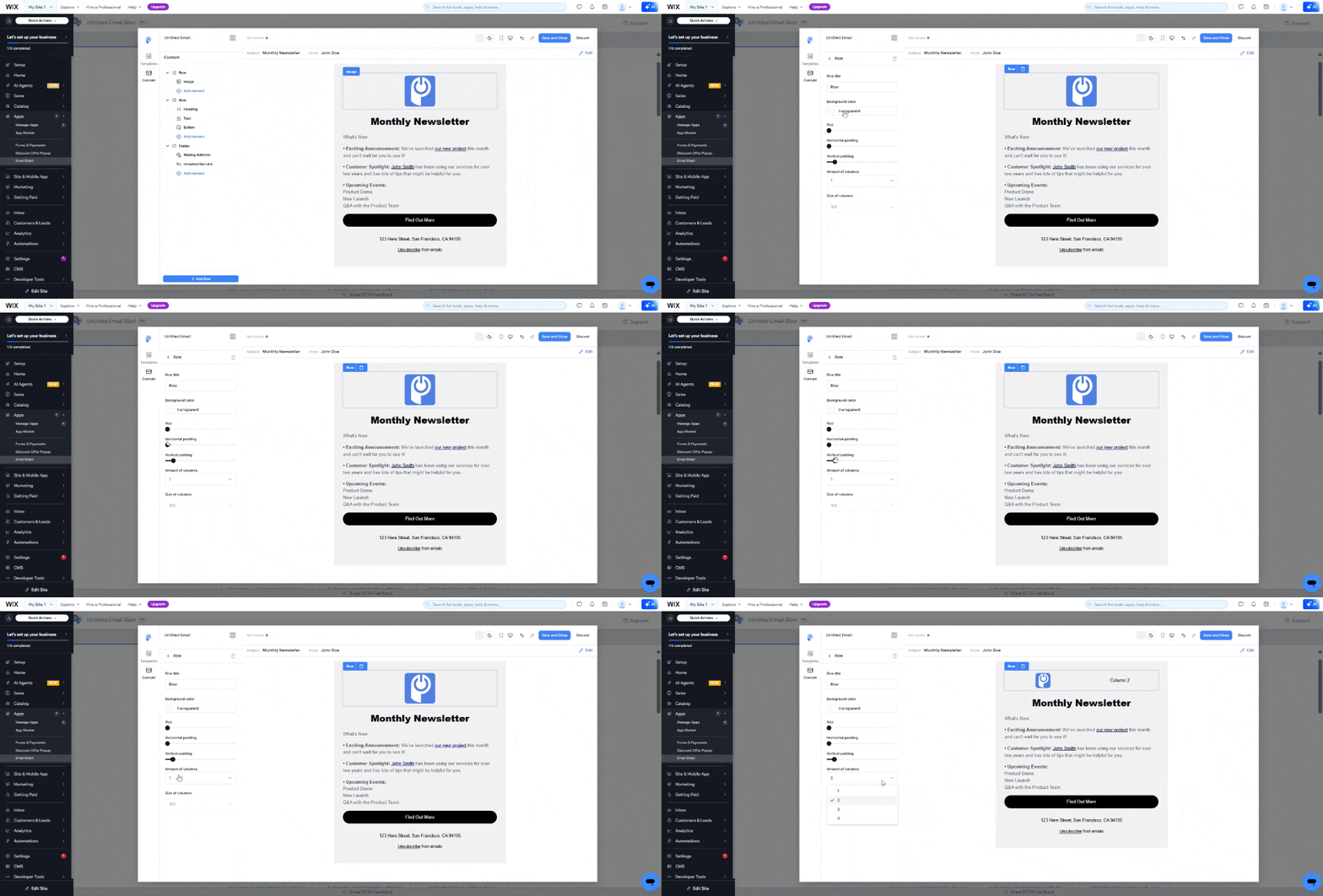
Each Row is a separate section and for each, you can add multiple elements (such as text, button, social account links and more) and further customize them.
Wait... there's more!
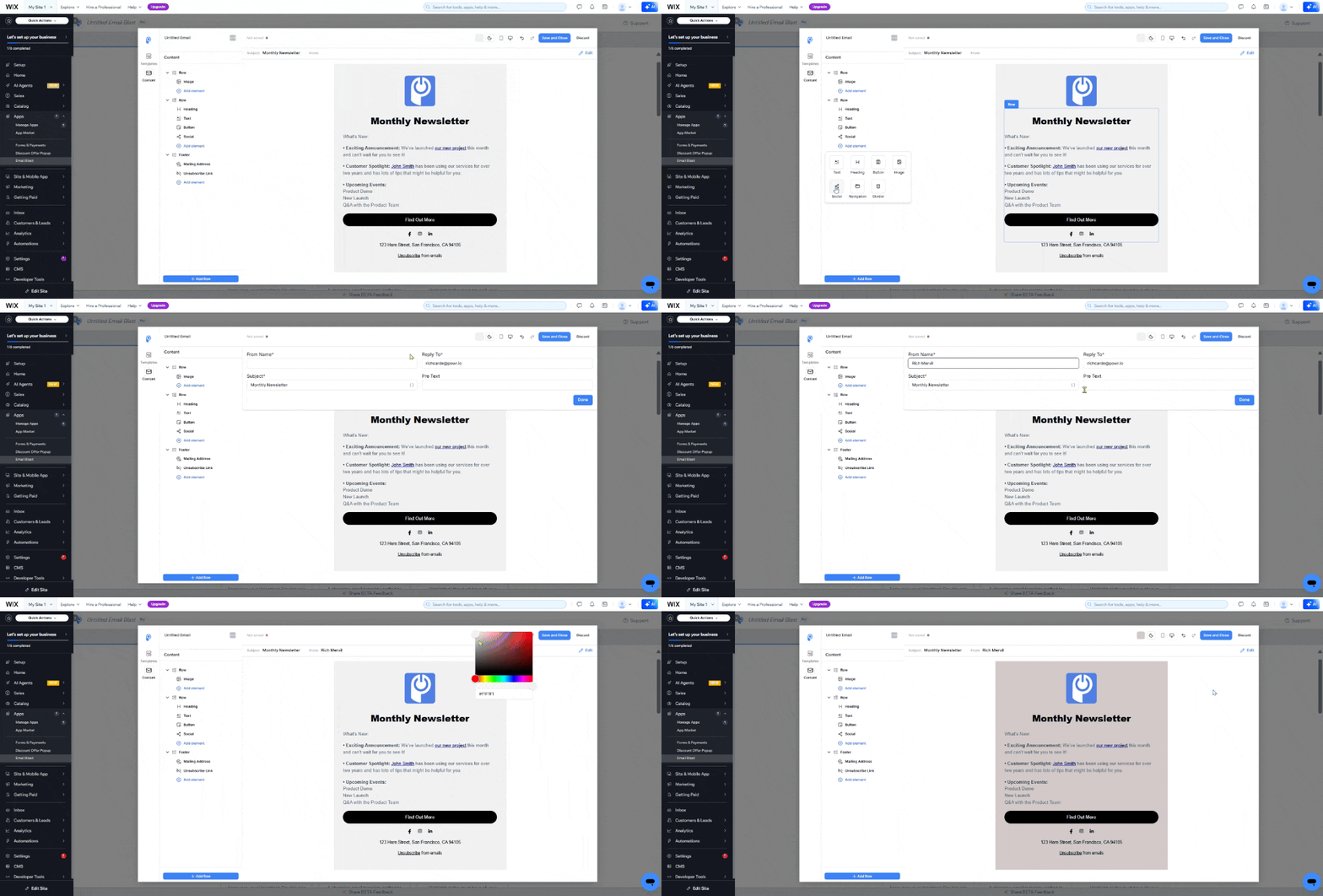
In addition to multiple element options, you can set your own campaign email subject, sender name and reply-to email of your choice. While a different background can be added for each row separately, it is also possible to set the full background of your choice for the entire email template.
Once the email design complete, just click the "Save" button at the top right and you'll be redirected to send a test email to make sure that everything looks exactly as expected before moving onto the next step.
STEP 4: Add your Recipient List
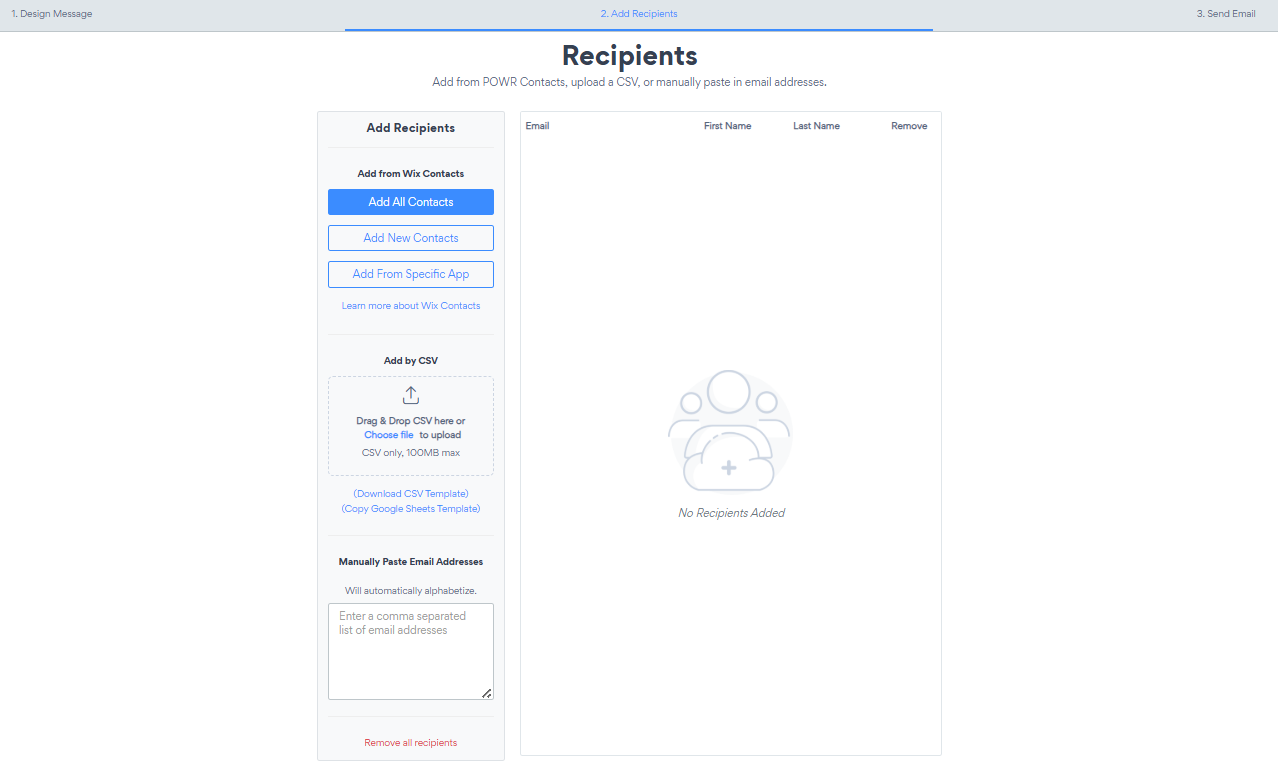
Your campaign recipients can be added either manually or automatically.
Manually: Simply add each email address (separated by a comma) in the dedicated box
Automatically: You have the option to import all of your Wix contacts (Add all contacts), import your Wix contacts within a specific time period (Add New contacts) or import contacts from your POWR Form Builder app - Add all contacts: Imports all of your Wix or Shopify contacts
- Add New contacts: Import your Wix or Shopify contacts from specific time frame of your choice
- Add From Specific App: POWR can pull contacts from almost every app that collects emails. You can select to pull from your last POWR Form Builder created, all of your POWR forms altogether or any Shopify or Wix app that collects emails for you.
Another option is to import the contacts with a CSV file. Please check our CSV template here for reference.
STEP 5: Preview, Test and Send
Now that you're all done, head to the "Send Email" tab and you will be provided with the options to send another test email, send the blast right away or schedule it for later (Send Later). Do you want to create other campaigns without necessarily starting from scratch? You can simply duplicate the campaign and you're good to go!
After sending, you'll be able to track key performance metrics for each campaign, including:
Deliveries – Emails that reached inboxes
Opens – Number of recipients who opened the email
Clicks – How many clicked on links in your email
Bounces – Undelivered emails due to invalid addresses
These analytics help you measure engagement and improve future campaigns.
What are the limitations?
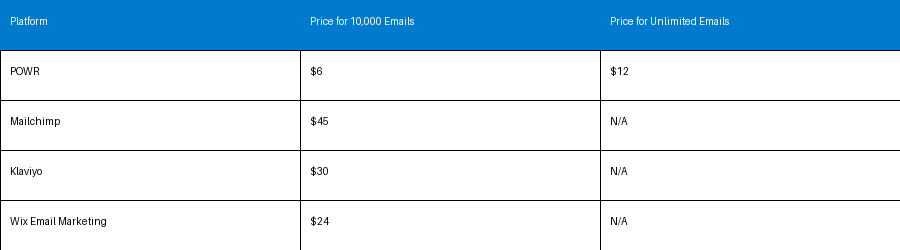
The opportunities are endless, all of our plans offer access to sending more emails than most of our competitors. Don't just take our words for it, see for yourself the monthly price and limit comparison below:
Need Help? Contact Support
If you're having trouble building your form or need help with advanced setup, we're here for you.
Click here to contact our support team
Want to explore premium form features and unlock integrations? Visit our Pricing Page to compare plans.