Connect PayPal or Stripe to POWR Pay Me
In this article
In this article group
- Getting Started with POWR Pay Me
- Create and Share a POWR Pay Me Payment Link
- Your POWR Pay Me Payments
- Refunds and Disputes in POWR Pay Me
- Add a Payment Link to a POWR Email
- Automations When Someone Pays You
- Use POWR Pay Me from Claude or ChatGPT
- POWR Pay Me Limits and FAQs
- Paying on powrpay.me: Help for Customers
POWR Pay Me sends every payment straight to your own PayPal or Stripe account. Connect at least one to start taking payments; customers can pay with any provider you connect. Only the site owner can connect or disconnect providers.
In This Article
Connect PayPal
Go to Settings → Payments.
Under Payment providers, click Connect next to PayPal.
Enter the email of the PayPal account that should get paid and click Continue. No PayPal account yet? Use the email you'll sign up with.
Check the email carefully, because a typo sends money to someone else. Then click Yes, connect PayPal.
Customers can pay you with PayPal right away.
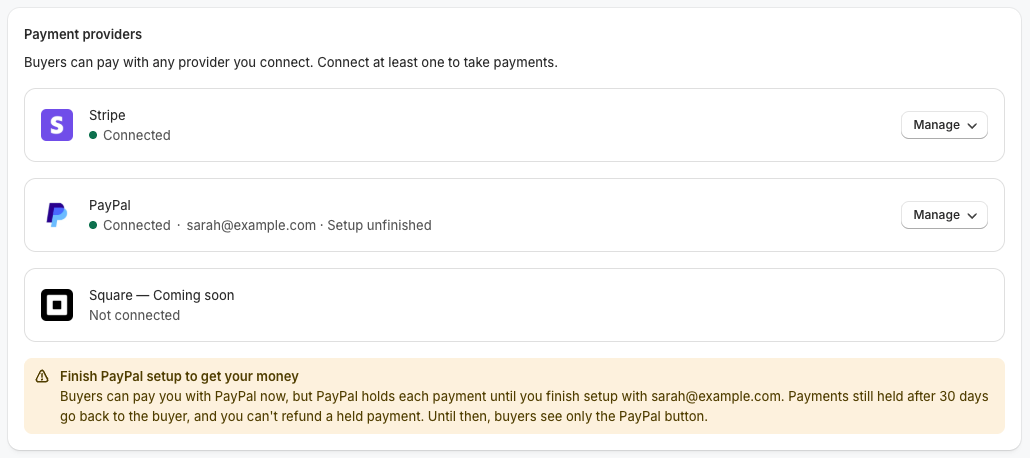
Finish PayPal Setup to Get Your Money
If the PayPal account for that email isn't fully set up, PayPal holds each payment until you finish. You'll see Held by PayPal next to those payments.
Click Finish PayPal setup in Settings → Payments and complete it in the window that opens. The page updates once PayPal confirms, which can take a few minutes.
Payments still held after 30 days go back to the customer.
You can't refund a held payment.
Until setup is finished, customers see only the PayPal button.
Connect Stripe
Go to Settings → Payments.
Click Connect next to Stripe.
Sign in to Stripe (or create an account) in the window that opens.
The page updates by itself when you're done. If nothing opens, allow pop-ups for powr.io and try again.
Change or Disconnect an Account
Click Manage next to a provider:
Change account connects a different account.
Disconnect stops customers paying with that provider until you connect one again. Payments you already received aren't affected.
If PayPal is still holding payments, switching emails or disconnecting means those payments go back to the customer 30 days after they were made, unless you reconnect the same email and finish setup.
Frequently Asked Questions
Does disconnecting Pay Me affect my PayPal Button or forms?
No. Pay Me's connection is separate from your other POWR apps.
Is Square supported?
Not yet. It's coming soon.
Who can connect providers?
Only the site owner. Collaborators can create links and see payments.
Need Help?
If you have any questions about POWR Pay Me, our support team is happy to help.