
Why Hasn't My Form Submission / Response Limit Reset?
If your Form Builder, Popup or Survey app submission/response counter hasn't reset at the start of a new billing period, don't worry. In most cases, your submission limit resets automatically each month according to your billing cycle date. If it doesn't, our support team can quickly help.
This article explains how submission limits work and what to do if your counter doesn't reset as expected.
In This Article
- How Submission Limits Work
- When Does My Submission Limit Reset?
- Why Didn't My Counter Reset?
- How to Check Your Current Usage
- Need Help?
How Submission/Response Limits Work
Every POWR Form Builder / Popup / Survey app's plan includes a monthly submission allowance.
For example:
Plan
Monthly Submission Limit
Free
25 submissions/responses
Starter
25-100 Based on your platform
Pro
1,000 submissions per month
Business
Unlimited submissions
Your submission counter tracks how many form submissions have been received during your current billing cycle (last 30 days).
Once you reach your monthly limit, your form will hide new submissions until your limit resets or you upgrade your plan.
When Does My Submission Limit Reset?
Your submission counter automatically resets at the beginning of each new monthly billing cycle.
For example:
- If your subscription renews on the 15th of each month, your submission limit will reset on the 15th.
- Annual subscribers also receive a monthly submission reset based on their billing cycle.
No action is required in most cases.
Why Didn't My Counter Reset?
Occasionally, the submission counter may not reset correctly due to a temporary response metadata issue.
If you've reached your new billing cycle and your counter still shows the previous month's usage, don't worry—our support team can investigate and manually reset it if needed.
When contacting support, please include:
- Your account email
- The URL to the specific page on your live website where any of your forms is installed
How to Check Your Current Usage
To view your submission count:
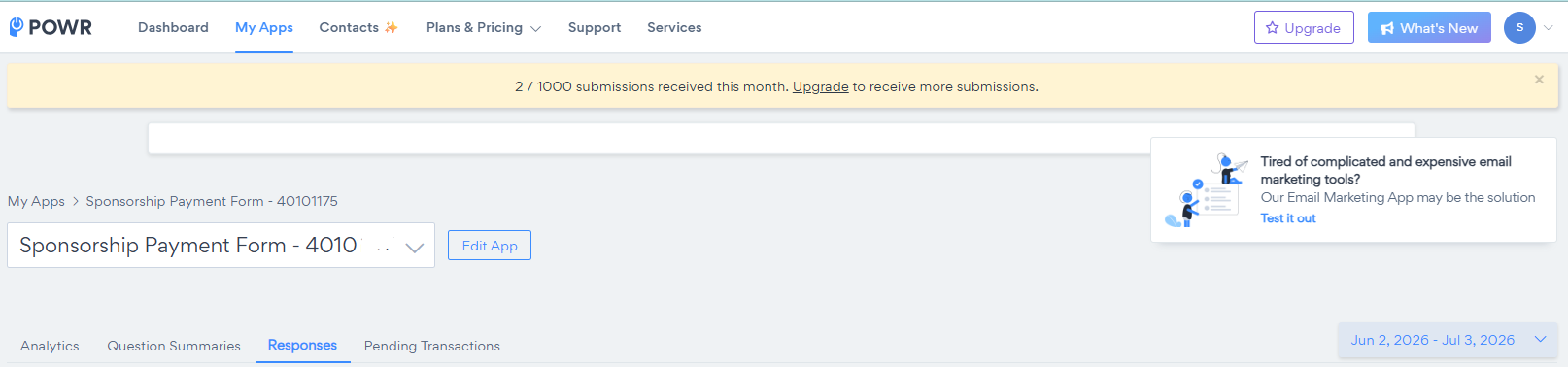
- Log in to your POWR Dashboard.
- Open your Form Builder app.
- Click the Responses tab.
- Your current submission usage will be displayed at the top of the page.
This allows you to monitor how many submissions you've used during your current billing cycle.
Need Help?
If your submission limit hasn't reset after your new billing cycle has started, our team will be happy to take a look.
Please include your account email and the name of the affected form so we can investigate as quickly as possible.
If you're regularly reaching your monthly submission limit, you may benefit from upgrading to a higher plan with increased or unlimited submissions. Compare plans on our Pricing Page: