
Unlock Venmo, Google Pay and more with "PayPal Complete Payments"
What Is PayPal Complete Payments?
If you use a PayPal account on POWR Form Builder or PayPal Button to accept fixed payments, donations, or subscriptions, you can now upgrade your PayPal connection to PayPal Complete Payments (PPCP).
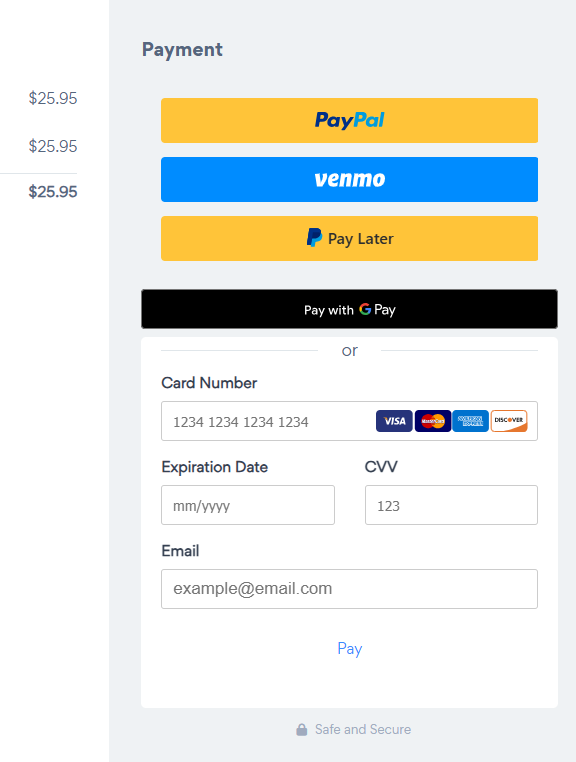
PayPal Complete Payments (PPCP) is PayPal's expanded checkout solution. Migrating to PPCP grants eligible merchants access to offer additional payment methods to their payers, such as Venmo, Google Pay, and more alongside traditional PayPal checkout, giving your customers and donators greater flexibility when completing a transaction.
The migration will also help preventing a payment-routing issue that has affected some PayPal-connected accounts.
Why Should I Upgrade My PayPal Connection?
If you already accept PayPal payments through POWR, upgrading your connection provides several benefits.
More ways for customers to pay: Eligible buyers can choose from additional payment methods instead of being limited to traditional PayPal checkout.
A smoother checkout experience: Giving customers familiar payment options can make it easier for them to complete purchases, donations, or subscriptions. That means a higher conversion rate for you!
Updated PayPal integration: Migrating connects your POWR app through PayPal Complete Payments and keeps your payment setup on the newer PayPal experience.
Resolves payment-routing issues: The migration also addresses a misrouted payment issue that has affected some PayPal-connected POWR accounts.
How to Upgrade in Form Builder
If you're using POWR Form Builder:
Open your form editor.
Go to the Payment tab.
Select Connect Payment Accounts.
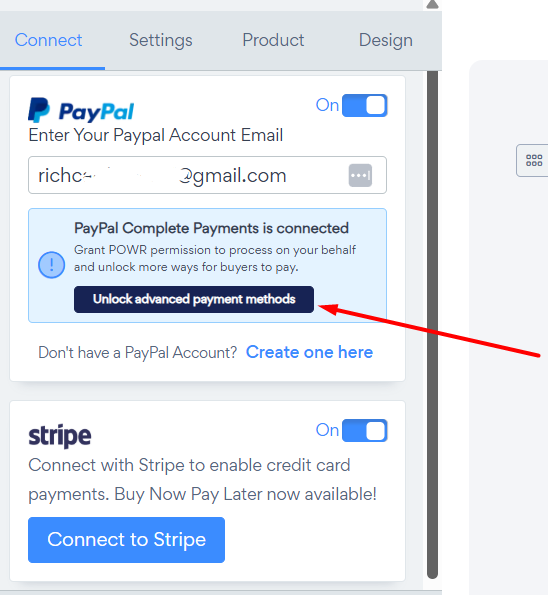
Click "Unlock Advanced Payment Methods" button underneath the PayPal option.
A secure PayPal window will open so you can continue the setup.
How to Upgrade in PayPal Button
If you're using the POWR PayPal Button, the Payment section appears as soon as you open the app editor. Just click "Unlock Advanced Payment Methods" underneath the PayPal payment option.
You'll then be redirected to PayPal to complete the migration.
Complete the Setup with PayPal
After clicking Unlock advanced payment methods, a secure PayPal window will open.
From there:
Sign in to the PayPal account you use to receive payments.
Authenticate your account when prompted.
Complete the form and any additional information requested by PayPal.
Follow PayPal's prompts to finish connecting your account.
The authentication and onboarding process takes place directly with PayPal, and POWR has no control or access there.
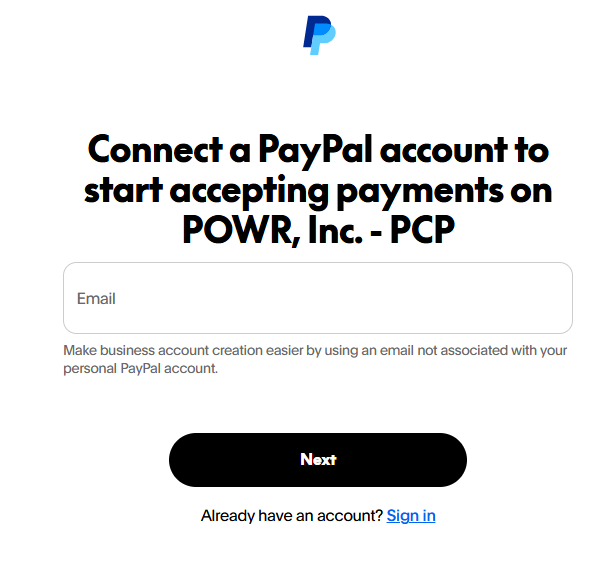
Important: Be sure to sign in with the PayPal account you want connected to your POWR app.
Will This Affect My Existing Payments, Donations, or Subscriptions?
Migrating changes the way your PayPal account is connected to POWR; it doesn't require you to rebuild your Form Builder or PayPal Button app.
Once the PayPal onboarding process is successfully completed, your POWR app will use the updated PayPal Complete Payments integration right away.
Troubleshooting
I don't see Venmo or Google Pay after upgrading
Not every payment method will appear for every transaction. PayPal determines which options are available based on factors such as location, currency, device, merchant eligibility, and buyer eligibility.
The absence of a particular payment method doesn't necessarily mean your PPCP connection was unsuccessful.
The PayPal authentication window won't complete
Make sure you're signing in with the correct PayPal merchant account and complete all information requested by PayPal.
If the process still doesn't complete, take a screenshot of any error message you receive and contact PayPal support team.
I've experienced payments going to the wrong PayPal account
Migrating your PayPal connection to PayPal Complete Payments is also intended to resolve the recent misrouted payment issue affecting some connected accounts.
Complete the migration using an active PayPal account that should receive your transactions. If you continue to see incorrect payment routing afterward, please contact us so we can look into it for you.
Need Help?
If you're having trouble upgrading your PayPal connection or your payments aren't working as expected after migrating, our support team is happy to help.
👉 Contact our support team:
https://help.powr.io/hc/en-us/requests/new
When contacting us, you'll be prompted to authenticate your email by signing in, and a confirmation code will be emailed to you. This helps ensuring our support team's reply will be delivered to you with no issue.
Want to explore additional payment and premium features available with POWR? Visit our Pricing Page: