
How to trigger POWR Popup on Click in Shopify
You can configure your POWR Popup to appear when a visitor clicks on specific elements of your webpage, such as text, images, or buttons. This method provides a more interactive experience compared to automatic popups.
In This Article:
How to Set Up Click-to-Trigger for POWR Popup
Add your POWR Popup to the desired page.
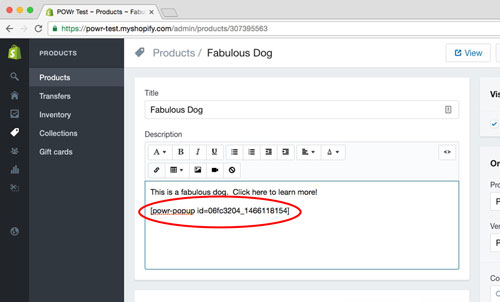
Switch to HTML mode in your website editor clicking on <>.
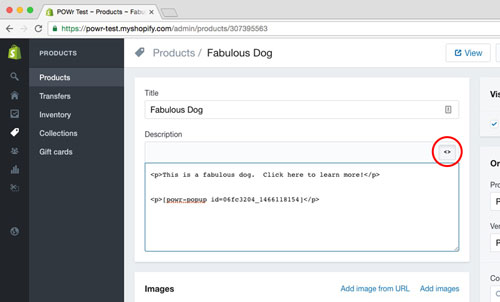
Wrap the element (text, image, or button) you want to use as a trigger with the **
trigger-popup**class.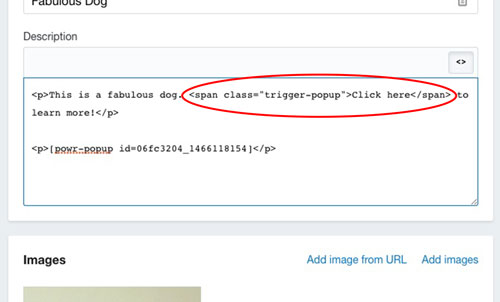
For example:
<span class="trigger-popup">Click here</span>Ensure the Popup's display settings are configured correctly.
In the POWR Editor, navigate to Controls > Schedule & Triggers.
Set "How often should visitors see the popup?" to "Every time anyone visits".
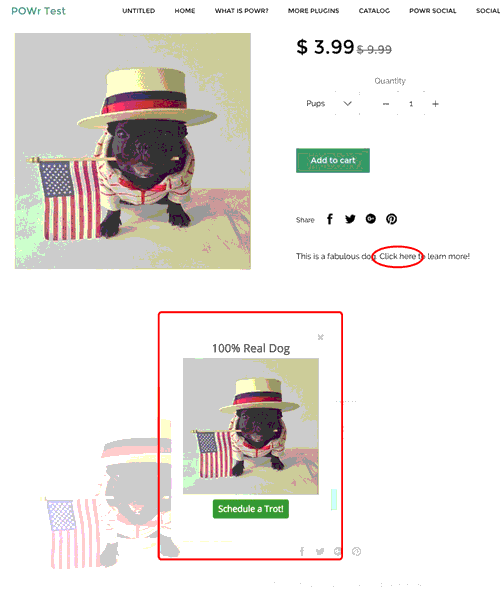
Note: If instead you want the Popup to appear on a new page after your visitor is redirected, just add the Popup to that new page instead.
Examples of Click Triggers
Text:
This is a paragraph.
This is a paragraph that will trigger a Popup.
Image:

FIX: BROKEN_ATTACHMENT (original: https://cdn.shopify.com/s/files/1/1061/1924/products/Sad\_Face\_Emoji\_large.png?v=1480481055)


FIX: BROKEN_ATTACHMENT (original: https://cdn.shopify.com/s/files/1/1061/1924/products/Smiling\_Face\_Emoji\_large.png?v=1480481056)

Button:
This is a button.
This is a button that will trigger a Popup.
<button **class="trigger-popup"** type="button">This is a button that will trigger a Popup.
⚠️ Important Notes
The
trigger-popupclass works best with<p>,<img>, and<button>elements. It may not function correctly with<div>elements.If you want the Popup to appear on a new page after redirection, add the Popup to that new page instead.
FAQs
Q: Will the Popup appear automatically without a click?
A: No, when using the trigger-popup class, the Popup will only appear upon clicking the designated element. Ensure that automatic display settings are disabled if you prefer click-only triggers.
Need Further Assistance?
If you have any questions or need additional help setting up your POWR Popup triggers, please contact POWR Support.