
"Content not available over encrypted connections" message on Blogger
Blogger and Blogspot is making HTTPS redirect the standard for more blogs. If this update has been made to your blog, you may see the above error message.
We're working on making the updates on our end to avoid this issue. In the meantime, please use the following workaround:
- Log in to your account at powr.io
- Open your App.
- In the platform dropdown, click "Add to my HTML site".
- Copy the code.
- Log in to your Blogger or Blogspot account.
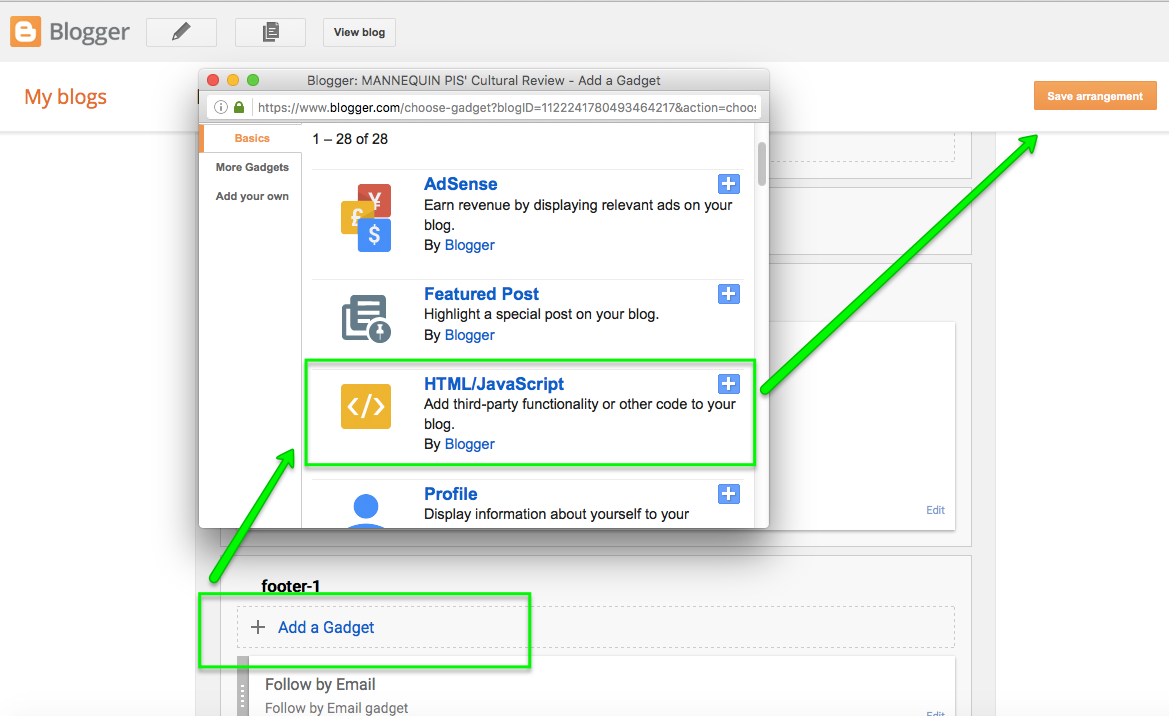
- Go to Layout and click "Add a Gadget" where you'd like to embed your POWR Apps.
- In the Gadgets selection, choose "HTML/JavaScript".
- Paste your POWR code into the element.
- Click "Save Arrangement".
This should make the App properly appear on your blog. If you continue experiencing issues with this, please contact our Support Team.